AutoProctor vs MonitorExam (2026): Which One Do You Actually Need?
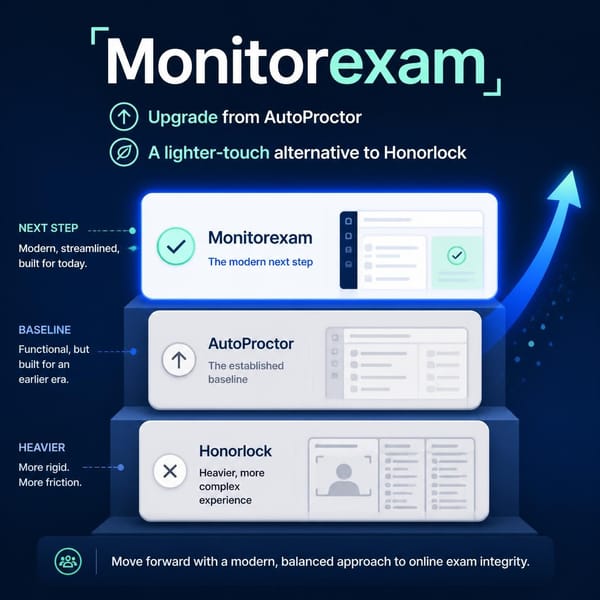
Both work with Google Forms and run in the browser with nothing to install. AutoProctor is a low-cost, subscription-based automated proctor. MonitorExam adds live invigilation, device-bound identity and camera-optional levels, with 15 free exams every month.

Quick Answer: AutoProctor is an established, low-cost automated proctor. On its standard setting a proctored attempt costs about $0.10 on a subscription that starts at $15/month, and it works with Google Forms, Microsoft Forms, other quiz links and your own site. It watches camera, microphone and screen-share feeds and gives you a Trust Score and evidence report after the test. MonitorExam is the better fit when you need a live invigilator dashboard with in-exam chat, device-bound FIDO2 identity checks, proctoring levels that include camera-optional modes, or pay-per-exam billing with 15 free exams every month and no subscription.
If your exams are low-stakes quizzes and you are happy to review flags afterwards, AutoProctor is probably enough, and it is cheaper per attempt. If someone needs to step in during the exam, or you cannot require cameras, look at MonitorExam.
Try MonitorExam's Demo: See How Proctoring and Test Delivery Work
Tried the AutoProctor demo? Run ours too. The MonitorExam demo is a JEE practice test you can take yourself, with the proctoring visible as it happens:
- Click Start Session to begin the practice exam.
- Use the Test Event Triggers to simulate a tab switch, a copy/paste attempt, an exit from full screen, or opening developer tools.
- Watch Live Metrics and the Event Log update as each event is detected and scored.
- Check the Algorithm panel to see exactly how the integrity score is calculated, so nothing is hidden.
It takes a few minutes, and it shows how test delivery and proctoring work together before you commit to anything.
Want to see the live invigilator dashboard and in-exam chat? The 20-minute demo covers both. Book a 20-minute demo
Is AutoProctor Free?
Partly. New accounts get 10 free test attempts, one-time credits that do not expire. After that you need a subscription. AutoProctor does not offer pay-as-you-go billing.
- Standard: $15/month for 150 proctored attempts
- Premium: $30/month (multiple users, Google Sheets export)
- Elite: $60/month (question banks, API/SDK access)
- Extra credits: 150 attempts for $15
- Timer-only tests (no proctoring) are unlimited on any active subscription
- Yearly plans save up to 12%
The free credits cannot be used for AutoProctor's Enhanced Proctoring features, which need an active subscription.
MonitorExam's free tier: 15 proctored exams per month, permanently. Not a trial, not credits with an expiry. The allowance resets every month and needs no credit card. In MonitorExam, one exam means one student completing one proctored session, which is the same unit as an AutoProctor "attempt," so the numbers below are directly comparable.
Pricing compared: AutoProctor, MonitorExam and Honorlock
| AutoProctor | MonitorExam | |
|---|---|---|
| Prices published | Yes | Yes |
| Free tier | 10 attempts, one-time | 15 exams/month, permanently |
| Billing model | Subscription ($15–$60/month) plus credit top-ups | Pay only for exams you run; no seat licences, no subscription |
| Standard proctoring | About $0.10 per attempt (1 credit) | International: $3–5/exam, falling to $2–4/exam at 1,000+/month. |
| Live intervention | Not listed on its website | Your own faculty watch, flag and chat live, with no per-session fee |
| Getting started | Self-serve | Self-serve in minutes |
| Annual discount | Up to 12% | 10% |
Why MonitorExam's pricing works for most institutions:
- Priced between the two. AutoProctor is the entry-level subscription for automated checks, at about $0.10 per attempt. Honorlock is a quote-based enterprise service with human proctors, at an estimated $8 per exam. MonitorExam sits in the middle at $3–5 per exam internationally (and less at volume), with live-invigilator tools (dashboard, in-exam chat, device-bound identity) included.
- Published prices, no sales call. Honorlock asks for a demo and a custom quote before you see a number. MonitorExam shows the price per exam up front, by volume. See the pricing page.
- 15 free exams every month, permanently. It is not a trial, and it needs no credit card.
- Pay only for exams delivered. No seat licences and no subscription. A student who leaves within 60 seconds is not charged.
- Prices fall as you grow. International drops from $3–5 to $2–4 per exam at 1,000+/month, India drops from ₹99 to ₹79 to ₹49 per exam as volume rises, and annual commitments get 10% off.
- Your faculty are the invigilators. There is no per-session proctor fee to unlock the live dashboard or chat.
Is AutoProctor Safe?
AutoProctor is an established product. It is built by Socratease, Inc., says it has run 20 million+ tests for 40,000 customers (the company's own figures), and displays SOC 2 Type 2 and GDPR compliance badges on its site.
What "safe" means in practice is that candidates are watched. In standard mode AutoProctor uses the candidate's camera, microphone and screen-share feeds, takes a face photo at the start of the test and random photos at intervals, and logs events such as background noise, no face or multiple faces, tab or window switches, multiple monitors and full-screen violations. Candidates should expect that, and you should tell them in advance.
The bigger question is whether it is sufficient for your exam's stakes. Compared with MonitorExam, AutoProctor is lighter in three places:
- No live view. Its site describes automated monitoring with a report after the test. We could not find a live invigilator dashboard or in-exam chat.
- Identity checks are add-ons. ID card verification and impersonation detection exist, but they are paid extras that match a face on camera. There is no device-bound credential such as a passkey.
- Camera-centred by design. The default model is built around camera, microphone and screen-share feeds.
Does AutoProctor Record Your Screen?
Not continuously by default. Standard proctoring uses a screen-share feed to detect tab and window switches, extra monitors and full-screen exits, and the report includes screenshots and an activity log. Full session recording, which captures screen activity, mouse clicks and typing, is an optional Enhanced Proctoring add-on at 4 extra credits per attempt.
MonitorExam records the screen at Level 4 and above, alongside tab behaviour and copy-paste events.
Does AutoProctor Record Your Camera?
It uses the camera, but continuous video is an add-on. AutoProctor takes a face photo at the start and random photos during the test, and uses the camera to flag no face or multiple faces. Candidate Video Recording, which records the camera throughout the test, is an optional add-on at 15 extra credits per attempt.
MonitorExam offers camera-optional proctoring. At Level 3 (browser monitoring, tab tracking and copy-paste detection), no webcam is needed and a full CredScore report is still generated. Camera only becomes required at Level 5+.
Does AutoProctor Detect Eye Movement?
Not as a listed feature. AutoProctor's published checks cover face presence, multiple faces, background noise and tab or window switches, and its sample report also shows categories such as phone usage and audio cues. Eye-gaze tracking, meaning where exactly the eyes are looking on screen, is not on that list.
MonitorExam's camera monitoring flags sustained face absence and multiple faces in frame. Neither platform positions itself as a dedicated eye-tracking tool.
Does AutoProctor Work Without a Camera?
Partly. The test creator chooses which checks to switch on, and camera monitoring is one of them. But AutoProctor's standard proctoring is built on camera, microphone and screen-share feeds, so face-based checks need a camera. Without one you lose most of what the Trust Score is built from.
MonitorExam's Levels 1–4 are camera-optional by design, which matters for shared family devices, low-bandwidth connections and privacy-sensitive cohorts. Level 3 still generates a full CredScore report.
How to Know If a Google Form Has AutoProctor
If a Google Form is proctored with AutoProctor, you will typically see one or more of these signals before the exam begins:
- A separate AutoProctor link. Instead of opening the Google Form directly, you receive an
autoproctor.colink and take the test on AutoProctor. - A permissions prompt. AutoProctor asks for camera, microphone and screen-share access before the exam starts.
- A pre-exam check. A brief system check runs before the first question appears.
- Your institution says so. Faculty usually state "this exam is proctored by AutoProctor" in the course instructions.
If you open a Google Form link directly with no permissions prompt and no AutoProctor landing page, the form is likely not proctored with AutoProctor.
Beyond automated-only proctoring: free to start
Live faculty dashboard, in-exam chat, FIDO2 identity verification and 7 proctoring levels. Camera optional. 15 exams/month free, permanently.
Start Free See Pricing Book a DemoCan You Chat With Students During an AutoProctor Test?
Not as far as its site shows. AutoProctor's model is automated monitoring: it records evidence, calculates a Trust Score, and the teacher reviews the report after the test ends. We could not find a live channel between teacher and student while the test is running.
MonitorExam is different. At live proctoring levels, your invigilator can open a direct chat with any individual student mid-exam, without pausing the test.
What Your Faculty See in MonitorExam's Live Dashboard
When an exam runs at a live proctoring level, your invigilator opens the MonitorExam dashboard and sees every active student in a live grid of screen feeds and webcam thumbnails. No scheduling, no third-party login, no per-session fee to unlock it. Your faculty member, your account, your exam.
They can:
- Watch all students simultaneously in the live grid
- Click any student to see their full screen and webcam in real time
- Flag a student for review without stopping the exam
- Open a direct chat with any individual student mid-exam
In-Exam Chat: Resolving Problems Before They Become Flags
Live intervention is the clearest functional difference between MonitorExam and automated-only tools such as AutoProctor. Where a tool has no live channel, the same moment becomes a flag to review later. With a live invigilator it can be resolved on the spot.
Real scenarios where this changes the outcome:
- A student's internet drops for 30 seconds. Without a live channel, the drop is logged and the student may panic and close their browser. With MonitorExam, the invigilator sees the drop and chats "your progress is saved, please reconnect," and the exam continues cleanly.
- A student keeps looking off-screen because their monitor sits at an angle. Without a live channel, that becomes a flag for post-exam review. With MonitorExam, the invigilator chats "please position your screen directly in front of you," the student adjusts, and there is no flag and no wasted review time.
- A student appears to be reading from a printed sheet. A post-exam flag may be reviewed after the student has already seen their grade. With MonitorExam, the invigilator can intervene in real time, or escalate to a documented flag with live context.
Head-to-Head Comparison
| Feature | AutoProctor | MonitorExam |
|---|---|---|
| Google Forms | Yes (add-on; candidates take the test on an AutoProctor link) | Yes (paste the form link) |
| Other platforms | Microsoft Forms, links from other quiz sites, your own site via JS SDK/API (API/SDK on Elite plan) | Any exam URL or platform |
| Installation | None | None |
| Camera | Central to standard proctoring; individual checks configurable | Optional at Levels 1–4; required from Level 5+ |
| Screen | Screen-share feed for tab/window checks; full recording is an add-on | Screen recording at Level 4+ |
| Live invigilator dashboard | Not listed on its website | Yes, faculty dashboard |
| In-exam chat with students | Not listed on its website | Yes |
| Identity verification | ID card matching and impersonation detection (paid add-ons) | FIDO2 passkey (device-bound credential) |
| Integrity report | Trust Score, screenshots, activity log | CredScore (7-dimension report) |
| Proctoring configuration | Pick individual checks, plus Enhanced add-ons | 7 preset levels, from practice quiz to certification exam |
| Free tier | 10 attempts, one-time | 15 exams/month, permanently |
| Billing | Subscription from $15/month, no pay-as-you-go | Pay per exam run, no seat licences |
| Standard cost | About $0.10 per attempt | $3–5/exam internationally ($2–4 at 1,000+/month) |
When to Choose Which
AutoProctor is the better fit when:
- Your exams are low-stakes quizzes and post-test review is enough.
- You want the lowest cost per proctored attempt and are comfortable with a subscription.
- You want phone-pairing (auxiliary device) coverage, which AutoProctor offers as an add-on.
MonitorExam is the better fit when:
- You need a live invigilator. Faculty can watch, flag and chat while the exam is running, not just review afterwards.
- Identity has to stand up to scrutiny. For certification or credentialled exams, MonitorExam's FIDO2 passkeys tie the attempt to a device-bound credential unlocked by the student's own biometric, which is significantly harder to spoof than a shared password or code.
- You cannot require cameras. Shared devices, low bandwidth and privacy rules are exactly where camera-optional levels help.
- Different exams need different security. Set Level 2 for a weekly quiz and Level 6 for a final, on the same platform.
- You do not want a subscription. Pay for the exams you run, and use the 15 free exams each month for the rest.
See the live dashboard in action
Live feeds, real-time chat, full cohort visibility. A 20-minute demo, and your faculty can run it from day one.
Start Free See Pricing Book a DemoFrequently Asked Questions
Is AutoProctor free? Partly. New accounts get 10 free test attempts as one-time credits that don't expire. After that AutoProctor needs a subscription, starting at $15/month for 150 proctored attempts. MonitorExam's free tier is 15 exams every month, permanently, with no credit card.
Is AutoProctor safe? AutoProctor is an established product that displays SOC 2 Type 2 and GDPR compliance badges and reports running 20 million+ tests. In standard mode it uses the candidate's camera, microphone and screen-share feeds, so candidates should expect to be monitored throughout the test. Whether it is sufficient depends on your exam's stakes.
Does AutoProctor record your screen? By default it uses a screen-share feed to detect tab and window switches, multiple monitors and full-screen violations, and keeps photos and screenshots as evidence. Full session recording of screen activity, mouse clicks and typing is an optional add-on that costs 4 extra credits per attempt. MonitorExam records the screen at Level 4 and above.
Does AutoProctor record your camera? It takes a face photo at the start of the test and random photos at intervals, and uses the camera to detect no face or multiple faces. Continuous camera video is an optional add-on at 15 extra credits per attempt. MonitorExam's camera-optional Levels 1–4 need no webcam.
Does AutoProctor detect eye movement? AutoProctor's published list of checks covers face presence, multiple faces, background noise and tab or window switches. Eye-gaze tracking is not listed. MonitorExam flags sustained face absence and multiple faces at camera levels, and neither positions itself as a dedicated eye-tracking tool.
Does AutoProctor work without a camera? Partly. The test creator can choose which checks to enable, including camera monitoring, but standard proctoring is built on camera, microphone and screen-share feeds, so face-based checks need a camera. MonitorExam's Levels 1–4 are camera-optional, and Level 3 still generates a full CredScore report.
How to know if a Google Form has AutoProctor? Look for a link to autoproctor.co instead of a direct Google Form URL, a camera, microphone and screen-share permissions prompt before the exam, or a pre-exam system check. Institutions that use it usually say so in the exam instructions.
What is autoproctor.co? autoproctor.co is the website of AutoProctor, an automated online test proctoring tool from Socratease, Inc. It works with Google Forms, Microsoft Forms, other quiz links and your own site, and gives teachers a Trust Score and evidence report after each test.
AutoProctor pricing: how much does it cost? Standard proctoring costs 1 credit (about $0.10) per attempt on a subscription that starts at $15/month. Enhanced add-ons cost 4 extra credits each (13 credits, about $1.30, with all four), and continuous candidate video adds 15 more. MonitorExam's India pricing is ₹99 per exam for 16–499 exams/month, falling to ₹49 at 1,000+; internationally it is $3–5 per exam, falling to $2–4 at 1,000+/month. Both come after 15 free exams every month.
How does MonitorExam pricing compare to AutoProctor and Honorlock? AutoProctor is a low-cost subscription with published per-attempt pricing (about $0.10 for standard proctoring). Honorlock publishes no prices, only custom quotes, at an estimated $8 per exam. MonitorExam sits between them at $3–5 per exam internationally ($2–4 at 1,000+/month), with published pricing, no subscription, 15 free exams every month, and live invigilator tools included.
Can MonitorExam replace AutoProctor? For many exams, yes. MonitorExam works with Google Forms by pasting the form link (or any exam URL), tracks tab switching and copy-paste, and adds a live invigilator dashboard, in-exam chat, FIDO2 identity checks and seven proctoring levels. If you rely on a specific AutoProctor feature, such as phone pairing, check that it is available at the level you plan to run.
Start for free, no credit card
15 proctored exams/month permanently. Camera optional. Works with Google Forms, Canvas, Moodle or any exam URL. CredScore delivered at submission.
Start Free See Pricing Book a DemoRelated reading: