
AI Exam Monitoring Software for Universities & EdTech
Add proctoring to any exam in 5 minutes. No installation. No camera required. Free to start.
Trusted by leading institutions worldwide





Security Dev Challenge 2022
Winner
SDA 2023 (SDG 4)
Education Excellence Award
10K+
Exams Conducted
5K+
Candidates Evaluated
15+
Countries Served
"MonitorExam transformed how we deliver secure assessments at scale."
Anit Gupta
Director SDG Olympiad
"The credibility score gives us unmatched confidence in exam integrity."
Anmol Jain
Director, Sunstone Eduversity
Core proctoring
What MonitorExam detects
Every session behaviour that indicates cheating — detected, timestamped, and included in the CredScore report at submission.
Identity verification
Confirm the right person — before the exam
Identity verification happens before the first question is answered. Three layers — biometric, document, and face — configurable per exam.
CredScore
7-dimension integrity report — at submission
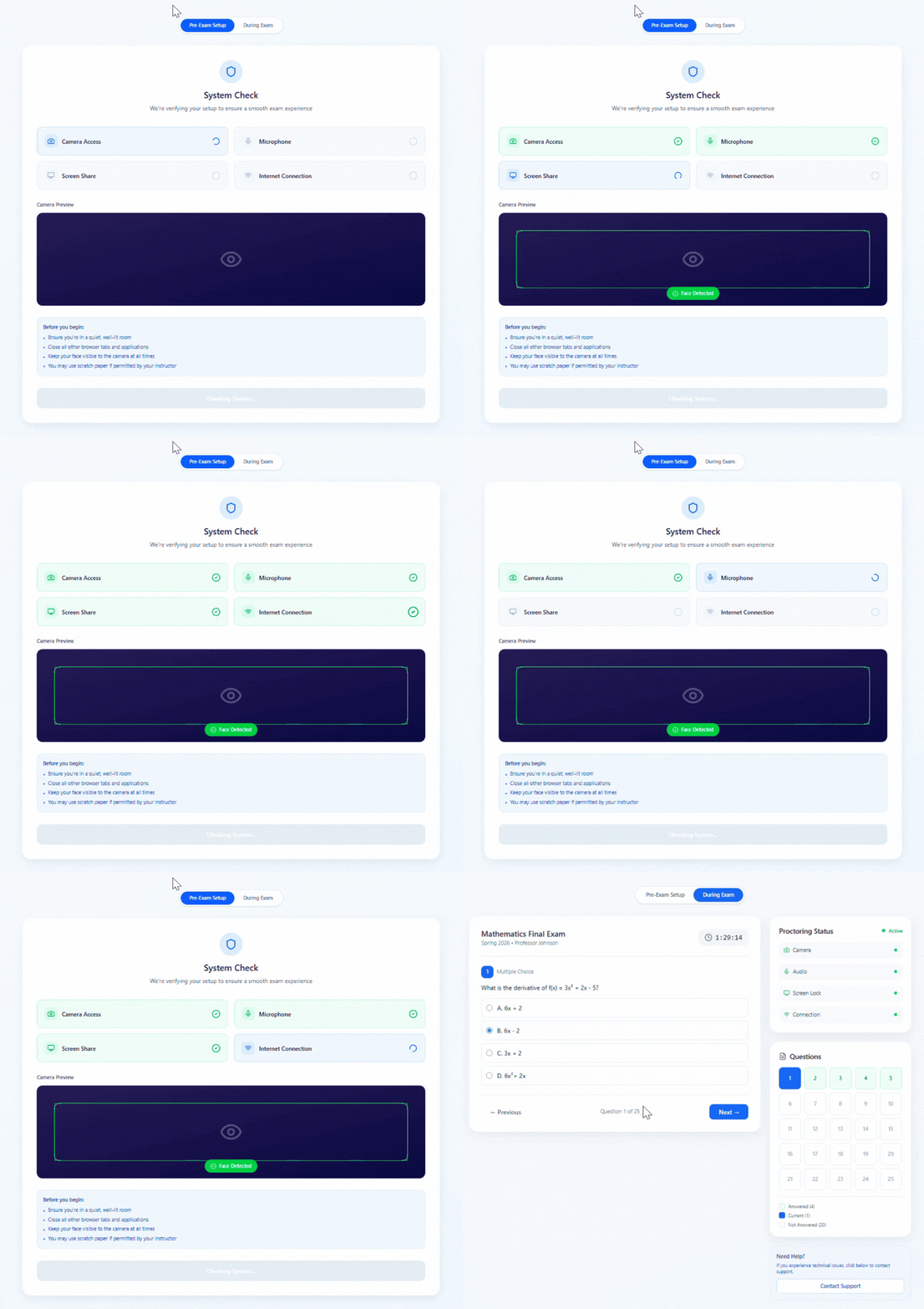
CredScore is generated automatically the moment a student submits. No video to review. No manual work. 1,000 students submitting simultaneously get 1,000 CredScores at the same moment.
CredScore — Sample report
2 paste attempts at Q4 and Q9.
3 tab switches detected.
Delivered at submission — no review queue.
Proctoring levels
7 levels — configured per exam, not per account
A weekly quiz and a final exam are not the same risk. MonitorExam lets you configure the right proctoring level for each exam independently.
AssessME
Built-in assessment platform
Build and deliver assessments directly in MonitorExam — no Google Forms required. Auto-graded. Question-wise analytics. CredScore and academic score in the same report.
Live monitoring + setup
From setup to CredScore in 5 steps
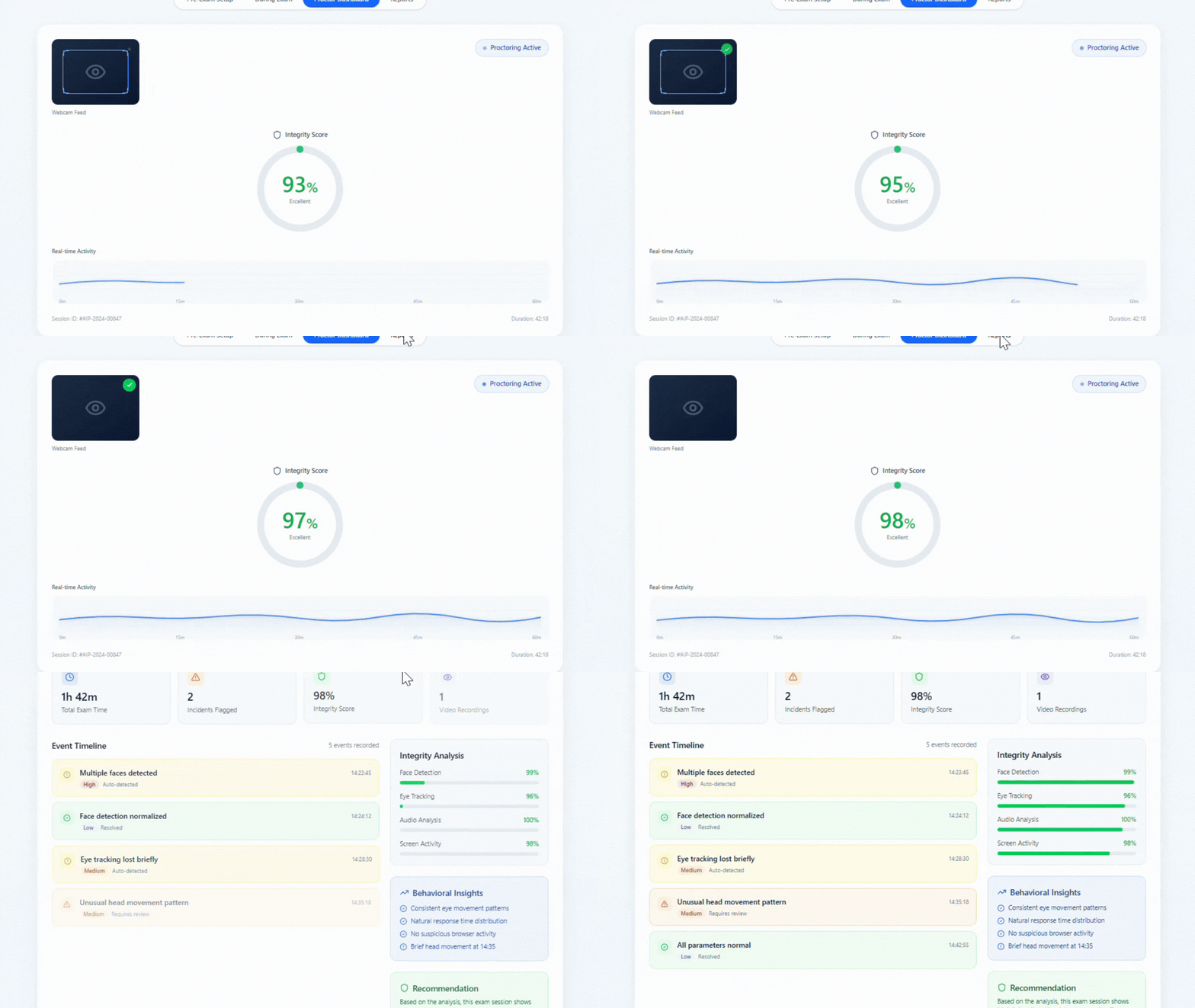
No training. No IT team. No installation on student devices. A teacher can set up their first proctored exam in under 5 minutes.
Live session log · 23 students active
Invigilator can chat with any student · Suspend session · Flag for review
Integrations
Works with every platform you already use
No migration. No rebuilding exams. Paste any exam link — proctoring applies automatically. Or embed via CredAPI for deeper integration.
Security & privacy
Built privacy-first from day one
MonitorExam monitors what the exam requires — nothing more. Camera is optional. Audio is not monitored by default. No biometric data stored.
Comparison
MonitorExam vs the alternatives
How MonitorExam compares against Honorlock, Proctorio, and AutoProctor on the features that matter most.
| Feature | MonitorExam | Honorlock | Proctorio | AutoProctor |
|---|---|---|---|---|
| Camera required | ✓ Optional | ✗ Required | ✗ Required | ✗ Required |
| Chrome extension required | ✓ None | ✗ Required | ✗ Required | ✓ None |
| Works with Google Forms | ✓ Yes | ✗ No | ✗ No | ✓ Yes |
| Tab-switch detection | ✓ Yes | ✓ Yes | ✓ Yes | ~ Limited |
| Copy-paste detection | ✓ Yes | ✓ Yes | ✓ Yes | ✗ No |
| FIDO2 biometric identity | ✓ Yes | ✗ No | ✗ No | ✗ No |
| CredScore automated report | ✓ At submission | ~ Manual review | ~ Manual review | ~ Basic report |
| Free tier | ✓ 15/month permanent | ✗ None | ✗ None | ~ Trial only |
| INR pricing (India) | ✓ ₹99/exam | ✗ USD only | ✗ USD only | ✗ USD only |
| Works on any browser | ✓ Yes | ✗ Chrome only | ✗ Chrome only | ✓ Yes |
| No installation required | ✓ Yes | ✗ Extension | ✗ Extension | ✓ Yes |
| Built-in assessment builder | ✓ AssessME | ✗ No | ✗ No | ✗ No |
| REST API (CredAPI) | ✓ Yes | ~ Limited | ~ Limited | ✗ No |
Based on publicly available documentation as of July 2026. Features may have changed. Full Honorlock comparison → · Full Proctorio comparison →
Not a trial. Not credits with an expiry. 15 proctored exams per month, reset on the 1st.
Paid from ₹99/exam (India) · $3/exam (International).
Every feature, ready
in 5 minutes
Free for 15 exams/month. No installation. No credit card. Works with Google Forms and every LMS you already use.
6 products · 1 platform
Seven products that extend MonitorExam
AssessME, VerifyME, CredAPI, CredME, ScreenME, AskME, and InterviewME — all integrated with your MonitorExam account. Same CredScore framework. No separate login.
Assessment Platform
AssessME
Build, deliver, and auto-grade assessments from scratch. MCQ, subjective, coding, PDF uploads — question-wise analytics and CredScore combined in one report.
Identity Verification
VerifyME
Government ID verification, FIDO2 passkey biometrics, facial recognition, and liveness detection — before the exam begins, not during.
API & Integration
CredAPI
REST API and webhook system for embedding proctoring, assessment delivery, and CredScore into any LMS, EdTech platform, or HR tool — white-label ready.
Credential Verification
CredME
Verify educational credentials, certifications, and professional qualifications instantly. Batch processing for institutions verifying thousands of records.
Screen Monitoring
ScreenME
Advanced screen capture and environmental monitoring. Detects screen sharing, second monitors, suspicious window activity, and records sessions for post-exam review.
AI Interview
AskME
AI-assisted structured interviews with real-time candidate evaluation. Generate question papers, conduct live sessions, and receive automated candidate scoring.
Interview Platform
InterviewME
End-to-end interview management with video recording, automated transcripts, structured feedback forms, and candidate ranking. Works with AskME.
All built on MonitorExam
Every product shares the same CredScore framework — so identity, assessment, and credentials all speak the same language inside your existing MonitorExam account.
How It Works
Simple, secure, and seamless exam delivery from start to finish.
Create Exam
Set up your exam with flexible parameters and security settings.
Candidate Authentication
Secure identity verification using FIDO2 or biometric authentication.
AI Proctoring
Real-time monitoring with AI-powered detection and assisted oversight.
Credibility Score & Reports
Get detailed integrity reports with actionable insights.
Solutions for Every Use Case
Purpose-built for universities, EdTech, and enterprise hiring.
Complete Exam & Assessment Suite
Five integrated products designed to work together for end-to-end exam proctoring, assessment delivery, and credential verification.
MonitorExam
Exam Proctoring & Monitoring
Real-time exam monitoring with AI-powered biometric verification, screen sharing lockdown, and human proctor oversight for secure online assessments.
Assessme
Assessment Platform
Comprehensive assessment creation and delivery platform with intelligent test builders, auto-scoring, and advanced analytics for measuring candidate performance.
VerifyMe
Identity & Credential Verification
Advanced identity verification and credential validation using government-issued documents, biometric matching, and third-party credential databases.
CredAPI
Proctoring Infrastructure & Assessment APIs
Embed identity verification, device readiness checks, automated proctoring, credibility scoring, and assessment workflows into your existing platform using SDKs, APIs, and webhooks.
ScreenMe
Screen & Environment Monitoring
Advanced screen capture and environmental monitoring to detect suspicious behavior, ensure test-taker compliance, and maintain exam integrity.
Seamlessly Integrated
All five products are built to work together. Share candidate data, assessment results, and verification status across your entire ecosystem.
- Single authentication across all products
- Unified candidate database
- Consolidated reporting & analytics
- API-first architecture
Integration Architecture Diagram
Privacy-First by Design
MonitorExam is built on a foundation of trust and transparency. We prioritize exam integrity without invasive surveillance or unnecessary data collection.
FIDO2 Authentication
Industry-standard passwordless authentication for secure identity verification.
Local Biometric Storage
Biometric data stored locally on device, never transmitted or centralized.
Encrypted Exam Sessions
End-to-end encryption for all exam data and session communications.
Privacy-First Architecture
No invasive surveillance. Only necessary data collected and processed.
SOC 2 Compliant
Type II certified
GDPR Compliant
Data privacy protected
99.99% Uptime
Enterprise SLA guaranteed
Proctoring SDK
Embed enterprise-grade proctoring into your platform in minutes with a few lines of code.
- Zero installation required for end users
- Works in any browser on any device
- AI-powered monitoring + compliance ready
import { createProctor } from '@monitorexam/sdk'

const proctor = createProctor({
  apiKey: 'YOUR_API_KEY',
  examId: 'exam_123'
})

proctor.start()See MonitorExam in Action
Watch a quick product walkthrough to see how our platform simplifies exam proctoring.
Ready to get started? Book a personalized demo with our team.
Book a DemoFast Setup
Get up and running in minutes, not days.
Transparent Reporting
Comprehensive insights into exam integrity.
24/7 Support
Dedicated support team always ready to help.
Real Results from Real Customers
See how leading institutions improved their assessment processes.
Sunstone Scholarship Program
Increased annual exam takers with 99% success rate.
Annual Exam Takers
50% Higher Offer Acceptance Rate
Corporate Hiring Platform
Reduced hiring assessment time by 60% while improving candidate quality.
Assessment Time
60% Reduction
National Olympiad
End to End National Olympiad for candidates annually.
Candidates had positive Experience
99%
Ready to Achieve Similar Results?
Join thousands of institutions that trust MonitorExam for their most important assessments.
Start Free TrialPay only for exams you run.
Never for seats you don't use.
No setup fees. No seat licenses. No surprises. Start free and scale as your exam volume grows.
Free tier is permanent — not a time-limited trial.
What will MonitorExam cost you?
Adjust your exam volume and proctoring level to see your exact monthly cost.
Everything about pricing
Is the free tier really permanent?+
Yes. The free tier covers up to 15 exams per month with no time limit. It is not a trial — you can use it indefinitely.
What counts as one exam?+
One exam = one student completing one proctored assessment session. If 30 students sit the same test, that counts as 30 exams.
Do I pay if a student fails to complete?+
No. Outcome-based pricing means you pay only for exams delivered and submitted. A student who abandons within 60 seconds is not charged.
Can I get INR invoicing for India?+
Yes. Indian institutions can receive invoices in INR. GST-compliant invoicing is available. Contact care@monitorexam.com.
Is there a discount for annual commitment?+
Yes — 10% off your monthly rate when you commit annually. Annual plans available from Standard tier upwards.
Is camera-optional mode available?+
Yes. Camera-optional mode is available from the free tier upwards — designed for low-bandwidth environments.
Ready to run your first secure exam?
Free to start. No installation. Works on any device in any browser.
Exam Integrity Playbook
Get the essential guide to maintaining exam credibility and security.
We respect your privacy. Unsubscribe at any time. View our Privacy Policy
What You'll Get:
Best Practices
Industry-leading strategies
Implementation Guide
Step-by-step framework
Case Studies
Real-world examples
Latest from the Blog
Insights on AI proctoring, online exams, and academic integrity.

11/4/2026
SDG Olympiad 2027: Help Your Child Go from Curious to Changemaker
Most children can tell you that plastic is bad for the ocean. Far fewer can explain why clean water, quality education and climate action are connected, or what a student their age can do about it. That gap is what the SDG Olympiad was built to close. Registrations for the 2026–27 edition are open, and the final Olympiad takes place on 30 January 2027. Registrations are open for Grades 2–9 Study material, practice tests and the final SDG Olympiad on 30 January 2027. Register Now Explore t
10/16/2026
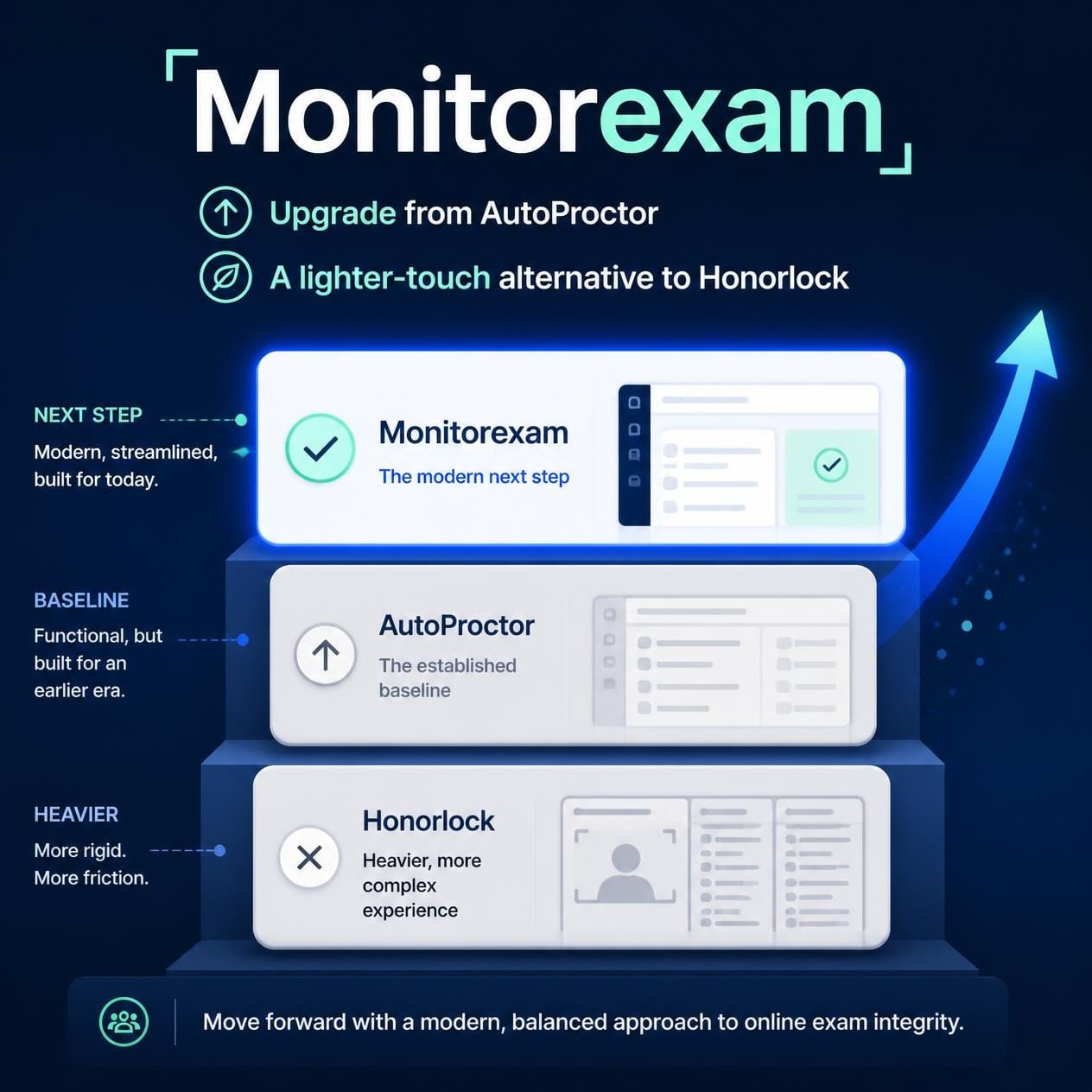
MonitorExam vs AutoProctor vs Honorlock: A Flexible, Self-Proctored Alternative
Outgrown AutoProctor or want something lighter than Honorlock? MonitorExam is a self-proctored, zero-install platform with 7 proctoring levels, live exam chat, Google Form proctoring and AssessME. Camera optional. Start free with 15 exams a month.
10/16/2026
In-Exam Live Chat in Online Proctoring: How Invigilators Support Candidates Without Stopping the Exam
A candidate's webcam freezes twenty minutes into a two-hour exam. Another can't see the last question. A third is about to switch tabs because they think the exam has ended. In a classroom, you would walk over and quietly help. In an online exam, with 300 candidates across three cities, you need a different tool. That tool is in-exam live chat: a direct message channel between the invigilator and the candidate that works during the exam, inside the exam window. This guide explains what it is, w